
Mainframe to Azure Migration: Legacy Modernization Guide
Migrating from a mainframe to Microsoft Azure is a strategic shift that moves your organization from rigid, high-cost hardware to a flexible, cloud-native ecosystem. This transition is not just about moving code; it is about adopting a modern operational model that supports rapid iteration and global scale.
70%
Avg. Reduction in OpEx
10x
Faster Deployment Cycles
99.99%
Azure Availability SLA
Understanding the Mainframe to Azure Migration Path
The journey begins with a clear assessment of your current COBOL, PL/I, or Assembler workloads. To succeed, you need a monolithic to microservices roadmap that defines how legacy logic will be decomposed into manageable, cloud-ready components.
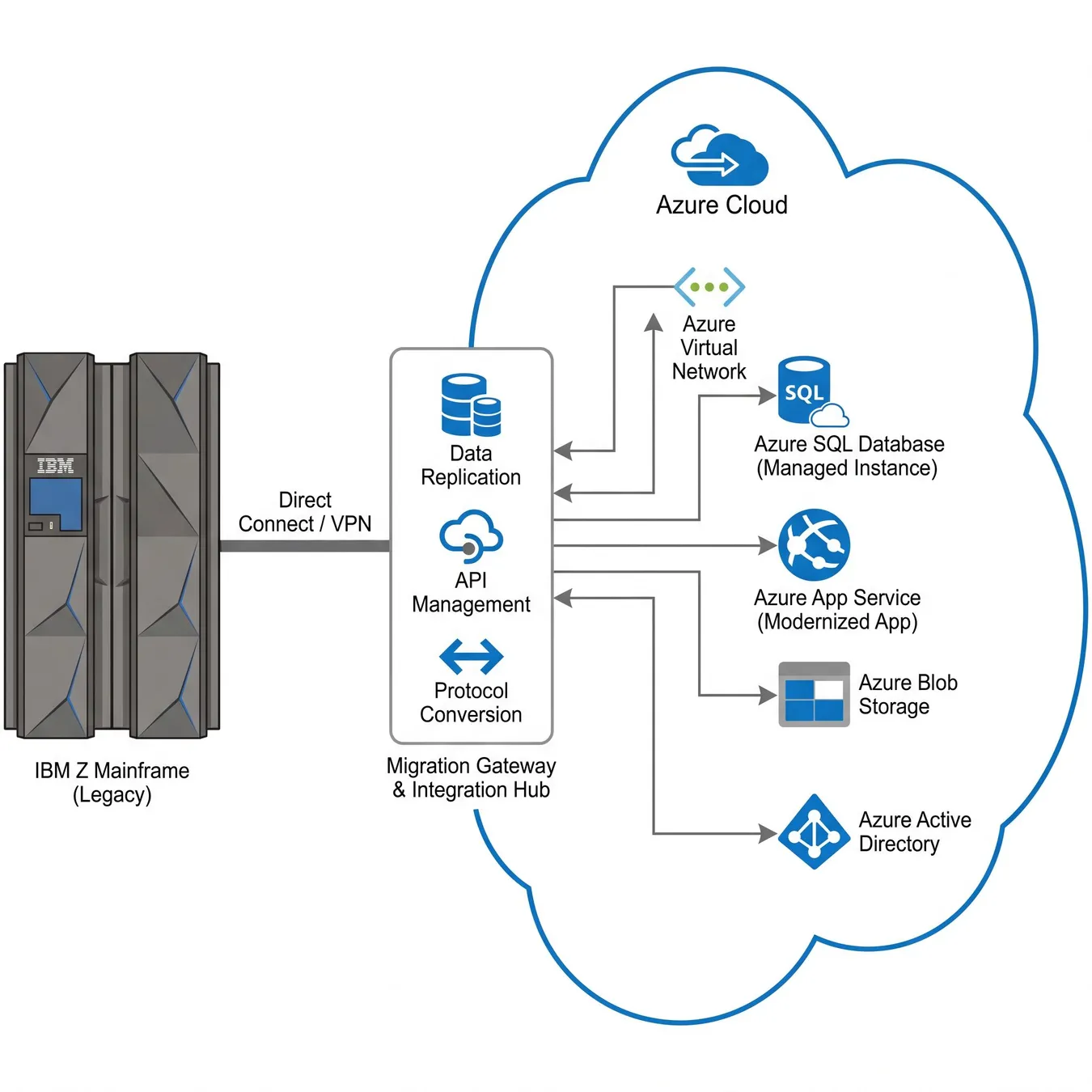
The conceptual bridge between legacy hardware and modern cloud architecture.
Core Migration Strategies: Rehost, Refactor, or Rebuild
Choosing the right strategy depends on your business goals, risk tolerance, and timeline. Most enterprise migrations utilize a combination of these three primary patterns.
- Rehosting (Lift and Shift): Moving workloads to Azure VMs or emulators with minimal code changes.
- Refactoring: Modifying the application to better utilize Azure PaaS services like App Service or SQL Database.
- Rebuilding: Completely rewriting the application using cloud-native patterns and modern languages like C# or Java.
When to Choose Rehosting
Rehosting is often the fastest way to exit a data center. It involves using tools like Azure Migrate to move mainframe-hosted applications into a virtualized environment that mimics the original hardware.
The Benefits of Refactoring
Refactoring allows you to maintain your core business logic while shedding the technical debt of legacy middleware. This often involves moving from VSAM or IMS DB to Azure SQL or Cosmos DB.
Trade-off
3 pros · 3 cons
Pros
Significant cost savings on licensing
Improved developer productivity
Elastic scaling for peak loads
Cons
High initial complexity in planning
Data consistency risks during transition
Skill gap for legacy developers
Architecting the Azure Landing Zone
Before moving data, you must establish a secure foundation. This requires rigorous cloud infrastructure planning and design to ensure that networking, identity, and security protocols meet enterprise standards.
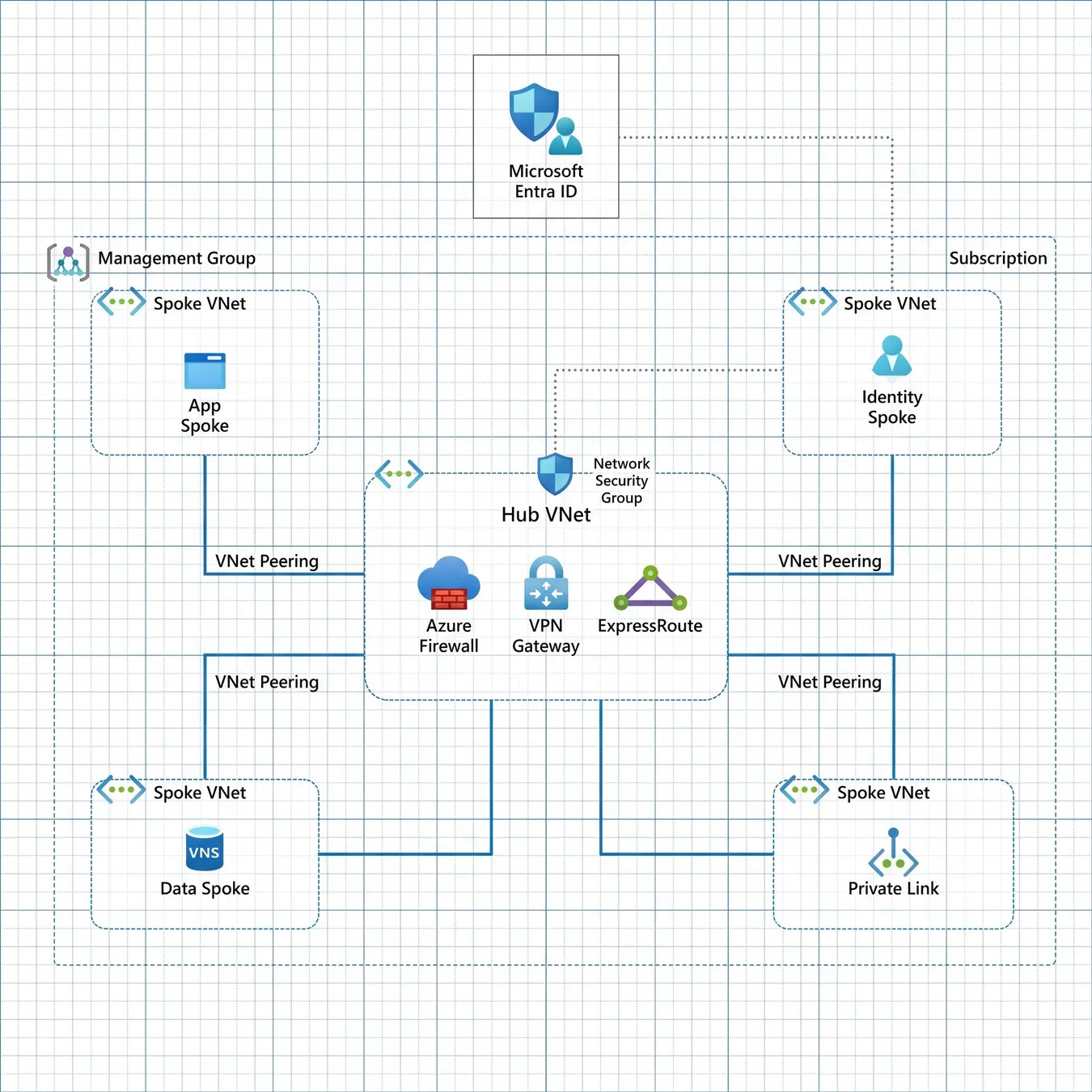
A standard enterprise Azure Landing Zone architecture for legacy workloads.
Data Migration and Modernization
Mainframe data is often stored in EBCDIC format, which must be converted to ASCII or UTF-8 for Azure. This process requires careful mapping of schemas to ensure data integrity is maintained across platforms.
Info.
// Data Integrity Tip
Step-by-Step Migration Roadmap
01 / 06
phase 01 / 06
Discovery & Inventory
phase 02 / 06
Target Architecture Design
phase 03 / 06
Data Migration Pilot
phase 04 / 06
Application Transformation
phase 05 / 06
Testing & Validation
phase 06 / 06
Cutover & Optimization
Security and Compliance in Azure
Azure provides robust security tools that often exceed the capabilities of on-premises mainframes. Utilizing Microsoft Entra ID for identity management and Azure Key Vault for secrets ensures a zero-trust posture.
Enable Multi-Factor Authentication (MFA) for all administrative accounts.
Implement Azure Policy to enforce compliance standards.
Encrypt data at rest and in transit using customer-managed keys.
Operational Scale and Performance
Mainframes are known for high-throughput batch processing. In Azure, this is achieved through services like Azure Batch, Data Factory, and high-performance compute instances that can scale out horizontally.
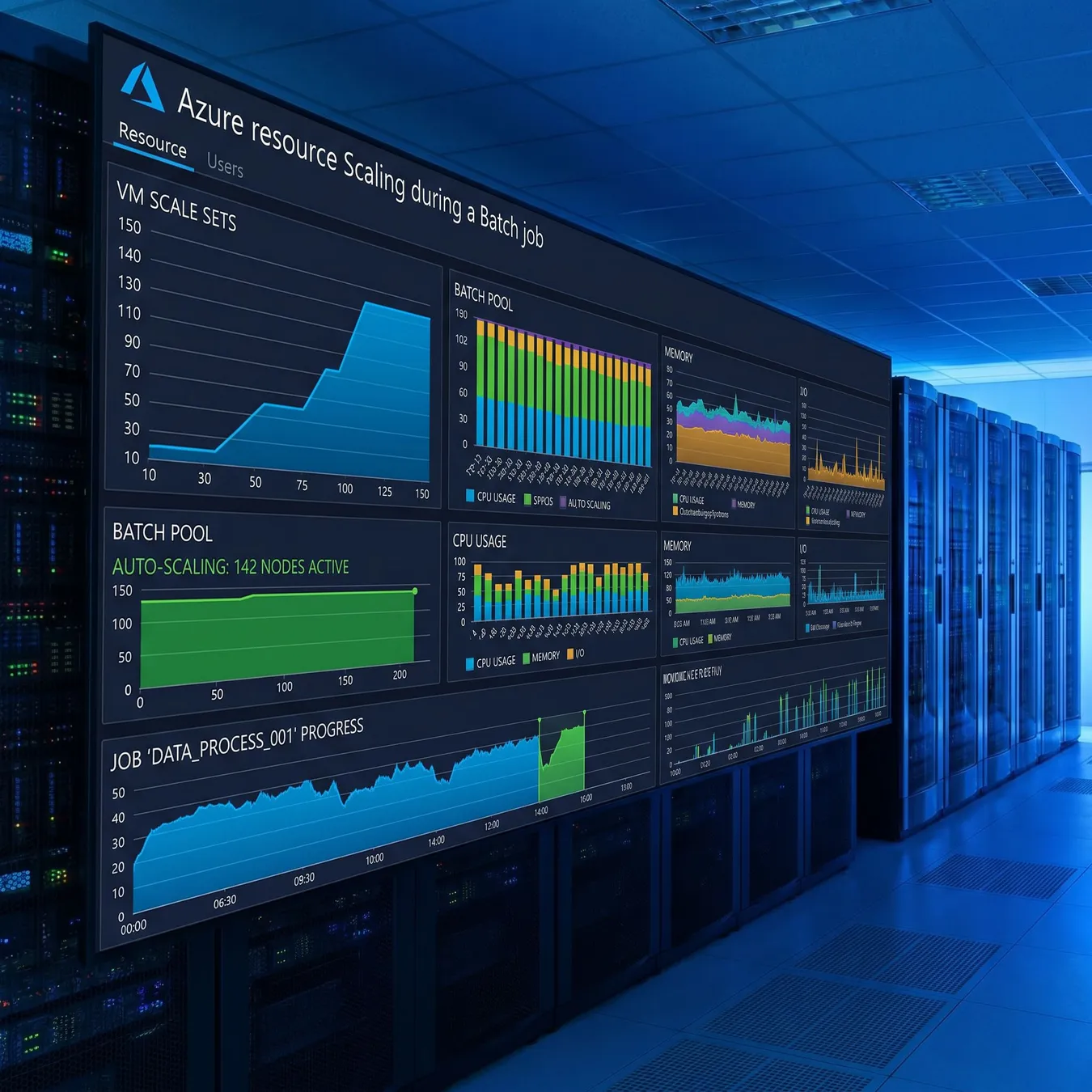
Dynamic scaling in Azure.
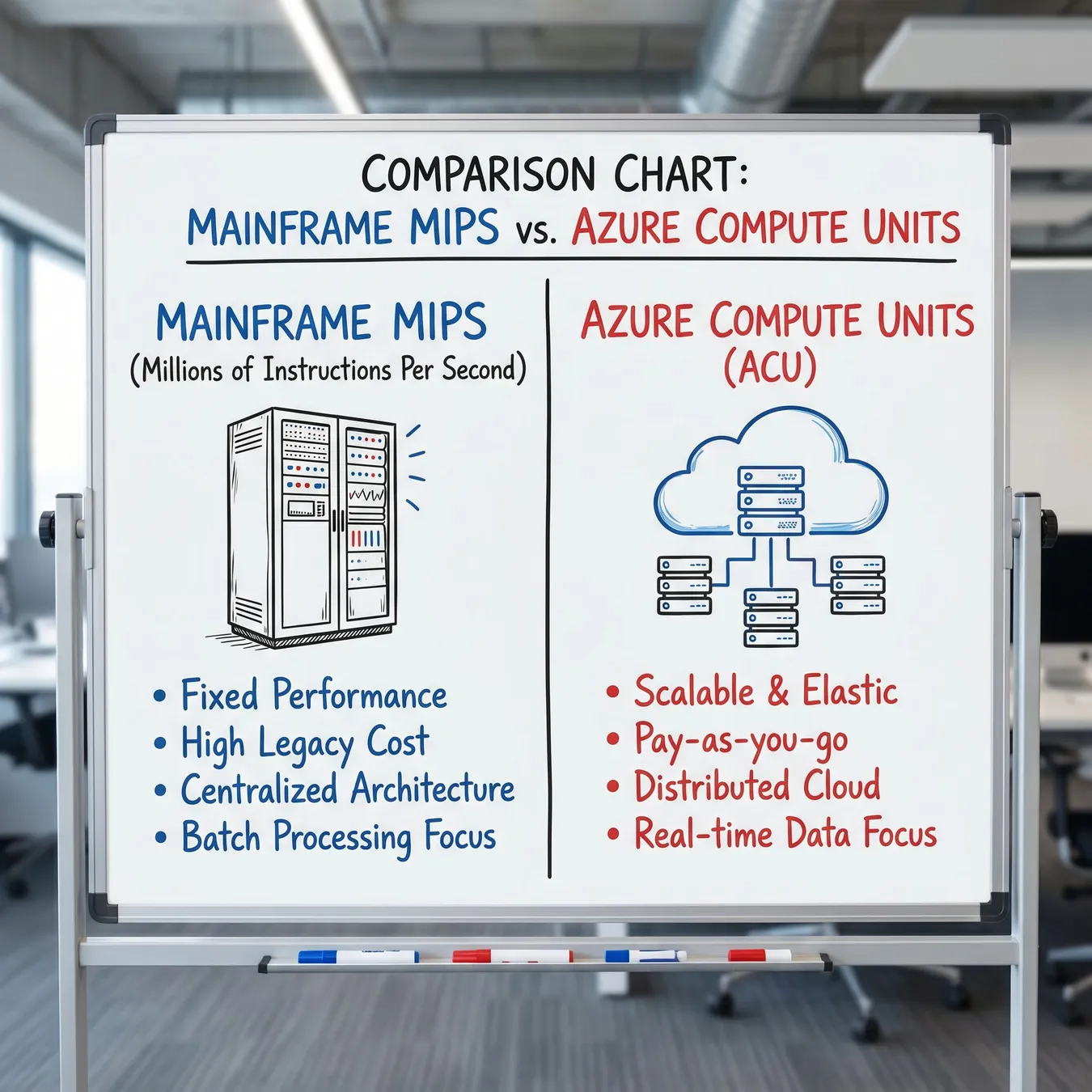
Performance benchmarking.
Common Pitfalls to Avoid
Prioritize low-complexity applications for the initial pilot.
Invest in automated testing early in the process.
Retrain your existing mainframe staff on cloud fundamentals.
Attempt a 'big bang' migration of all systems at once.
Ignore the latency requirements between cloud and on-prem.
Underestimate the complexity of legacy data formats.
Frequently Asked Questions
Bridging the Gap with Studio 402
At Studio 402, we specialize in rescuing legacy systems and transforming them into durable, cloud-native platforms. We understand that mainframe migration is a high-stakes engineering challenge that requires more than just a vendor—it requires a partner.
Whether you are dealing with a 'vibe-coded' prototype that failed to scale or a decades-old mainframe monolith, our team provides the architectural depth and execution discipline needed to reach production-ready outcomes.
Modernization is not a destination; it is the process of building a foundation that allows your business to move at the speed of the market.
Studio 402 Engineering Team · Systems Architects
Our Approach to Legacy Rescue
We don't just move your problems to the cloud. We audit your existing codebase, stabilize fragile integrations, and rebuild core systems for long-term maintainability and security.
Why Partner with a Product Studio?
Unlike traditional body shops, Studio 402 takes ownership of the outcome. We combine senior engineering talent with a product-first mindset to ensure your Azure migration delivers actual business value, not just a different hosting bill.
Trusted by growth-stage companies to build and scale mission-critical systems.
From MVPs to legacy modernization.
Next Steps for Your Modernization Journey
The first step in any successful migration is a thorough technical audit. By understanding the dependencies and bottlenecks in your current system, you can build a roadmap that minimizes risk and maximizes ROI.
Ready to Modernize Your Mainframe?
Let's discuss your migration roadmap and how Studio 402 can help you build a scalable, cloud-native future on Azure.
Related Resources
Explore more about enterprise application modernization and how to improve operational efficiency through strategic technology shifts.
- Azure
- Mainframe
- Migration
- Cloud-Native
- Legacy Rescue
Our team at Studio 402 is dedicated to helping you navigate the complexities of legacy systems. We provide the senior leverage needed to make informed decisions on stack, security, and architecture.
Legacy modernization is a continuous process of improvement. By moving to Azure, you unlock the ability to integrate AI, automate workflows, and respond to customer needs with unprecedented speed.
Don't let technical debt block your growth. A structured migration to Azure is the key to unlocking your organization's full potential in the modern digital economy.
Contact us today at studio@402.studio to begin your discovery phase. We look forward to building the future of your enterprise software together.
Final thoughts: Mainframe to Azure migration is not just a technical task; it's a business transformation. Ensure your leadership is aligned on the long-term benefits of cloud agility.
Thank you for reading our guide. We hope this roadmap provides the clarity you need to start your modernization project with confidence.
Stay tuned for more insights on cloud infrastructure, AI integration, and production-grade software engineering from the Studio 402 team.
Modernize. Scale. Succeed. That is the Studio 402 promise for every legacy rescue and cloud migration we undertake.